Customers and marketing
Your email list and basket reminders
Who has agreed to hear from you, how to export the list, and the automatic reminder that brings back abandoned baskets.
In the consoleGrow → Marketing
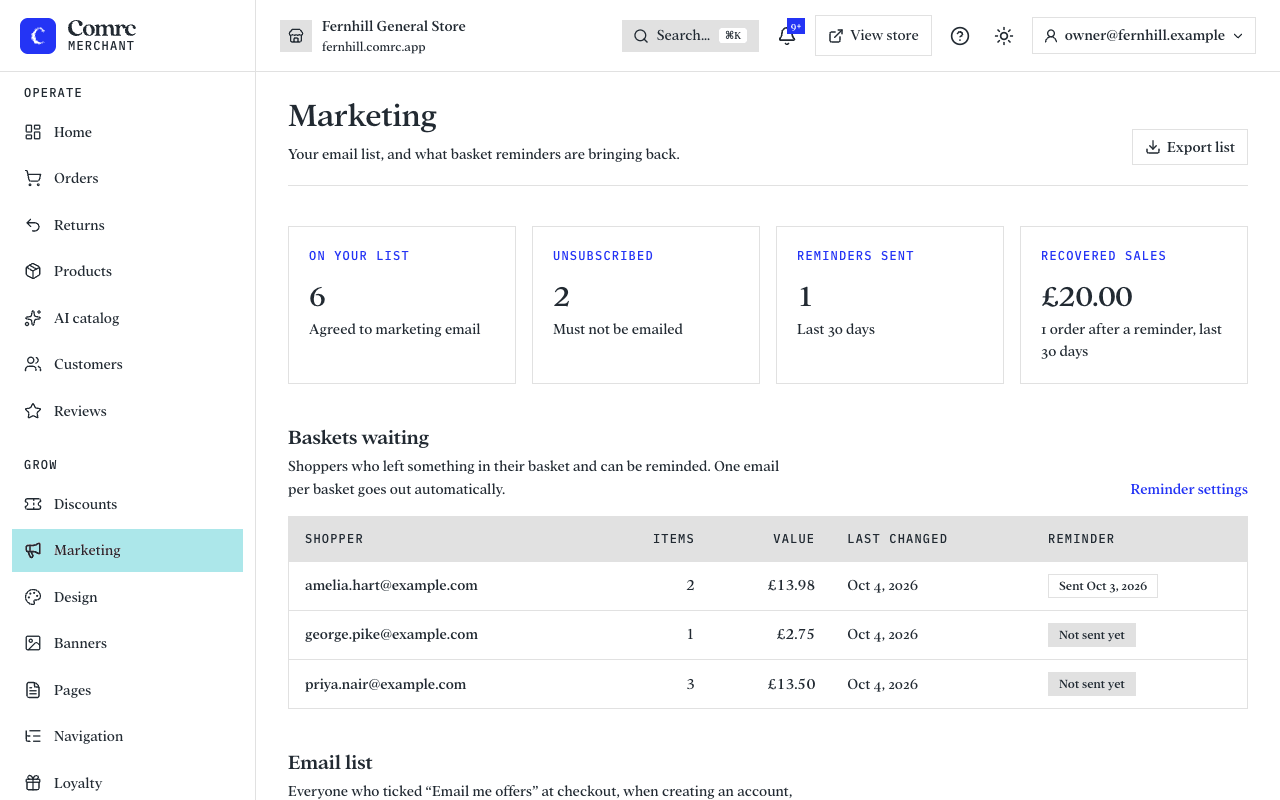
Marketing shows two things: the people who have agreed to receive marketing email from your store, and what basket reminders are bringing back.
How people join your list
- Ticking "Email me offers and reminders" at checkout.
- Ticking the same box when they create an account, or switching it on in their account later.
- Signing up in the newsletter box on your store.
The box is never ticked for them. Comrc records when and where each person agreed, so you can show it if you are ever asked.
Using the list
Export list downloads the email addresses that are opted in today, to use with your email tool. People who have unsubscribed are shown in the console so you can see who has left, and are never included in the export.
Basket reminders
When a shopper who is on your list leaves items in their basket, Comrc sends one email in your store's name with a link that brings the basket back, on whatever device they open it on.
- It only goes to shoppers who agreed to marketing email, and never to anyone who has unsubscribed.
- Nothing is sent if they have ordered since, or while your store is closed.
- Baskets waiting lists who would be reminded and whether the reminder has gone.
- Recovered sales counts orders placed from a basket after its reminder was sent, over the last 30 days.
Switch reminders on or off, and choose how long to wait before sending, under Settings → Basket reminders.